Connect Amazon Seller Central to QuickBooks, import settlement payouts, and post reconciliation-ready sales, fees, refunds, taxes, reserves, and deposits into QuickBooks.
Import each Amazon settlement with its sales, fees, refunds, taxes and reserves.
Turn Amazon settlement deposits into QuickBooks entries that explain the bank feed.
Use your trial to prove one Amazon settlement imports, posts, and reconciles before backfilling history.

Amazon pays you in batches. Each deposit mixes sales, fees, refunds, and taxes, so it rarely matches your QuickBooks books on its own. An Amazon settlement report can hold more than 100 transaction types. Taxomate groups them into categories such as sales, fees, refunds, and taxes. Taxomate imports the Amazon settlement deposit and posts one summarized entry to QuickBooks that matches the bank deposit. You skip the spreadsheet.
Compare Amazon to QuickBooks options, including QuickBooks' own connector, in our full guide
Connect your Amazon seller account. You sign in to Seller Central and approve access. Taxomate then starts importing your settlement reports.
Connect QuickBooks Online. You sign in with Intuit and approve access to your company file.
Run Quick Setup to create default income, expense, and cost of goods accounts in QuickBooks, or pick accounts you already have. Then check the account for each category. You can change any mapping later. Taxomate does not post until the required mappings are set.
Open an Amazon settlement in Taxomate. It shows the sales, fees, refunds, and tax totals grouped by category, and the settlement total that lands in your bank. You can group the lines by transaction type, SKU, or order.
Post the settlement. Taxomate creates one summarized entry in QuickBooks as a journal entry or an invoice, based on your posting setting. You can also turn on auto-post so new settlements post after the deposit date.
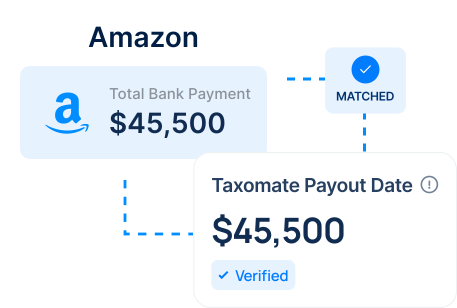
Match the posted entry to the bank deposit in QuickBooks. The posted total is the settlement total, so it lines up with the deposit. If you turned on auto deposit, Taxomate also records the deposit to your bank account.
Taxomate groups each settlement by category and posts them to the QuickBooks accounts you map. The table lists the categories and where each one goes.
| Transaction type | Where it goes |
|---|---|
| Sales (product price) | Income account |
| Shipping income | Income account |
| Refunds | Income account, as a reduction of sales |
| Commissions and selling fees | Expense account |
| Fulfillment and warehousing fees (FBA) | Expense account |
| Advertising | Expense account |
| Tax collected | Liability account |
| Tax remitted by Amazon (marketplace facilitator tax) | Asset account |
| Reimbursements for lost or damaged inventory | Income account |
| Reserved balance | Asset or liability account |
| Payable to Amazon | Clearing account |
Plans start at $14/month for one sales channel with up to 200 orders a month. Every plan has a 14-day free trial. See pricing.
Short answers on how a payout-based workflow handles Amazon deposits in QuickBooks.
Start with the Amazon settlement deposit, import the related sales, fees, refunds, taxes, and adjustments, then review the summarized QuickBooks entry before posting.
Yes, if the workflow uses the payout as the control total and posts a summarized entry that can be matched against the bank deposit in QuickBooks.
Use one recent Amazon settlement deposit as the activation test. The workflow is ready to scale when the first import, first successful post, and bank reconciliation all line up.
First-post proof
Before you backfill Amazon history, use one representative settlement payout to confirm the import, QuickBooks post, and bank deposit match.
Reconciliation playbook
The goal is settlement-level accounting, not order-level detail. The entry in QuickBooks explains the Amazon deposit.
Use the Amazon settlement payout as the source of truth, including sales, fees, refunds, tax, reserves, reimbursements, and adjustments.
Check the summarized QuickBooks post before sending it so Amazon settlement activity lands in the right revenue, fee, tax, and clearing accounts.
The first successful QuickBooks post should match the Amazon settlement deposit before older periods are imported.
Activation checklist
Comparing ecommerce accounting tools?
See how A2X, Link My Books, and Taxomate compare for this exact Amazon to QuickBooks payout workflow before you test your first import and post.
Exhausted from constantly grappling with the intricacies of manual data entry? Fed up with the time-consuming tasks and the ever-lingering possibility of human error? With our automated system, you can say goodbye to the tedious task of manually handling your financial data.
Taxomate turns each Amazon payout into one summarized entry in QuickBooks, so you match one entry to each deposit instead of copying payout reports by hand.
Sales, fees, refunds, shipping and tax post to the accounts you map, so your profit and loss report shows each one. Taxomate can also send summarized cost of goods sold (COGS) entries.
Each summary breaks the payout down into sales, refunds and fees, and its total equals the deposit. You can review it before it posts.
Taxomate turns your Amazon sales, fees and tax data into summarized entries that match your payouts in QuickBooks.
No payout spreadsheets: Taxomate imports each Amazon payout for you, so you do not rebuild it from reports in a spreadsheet.
The same mappings every time: Every payout posts with the account mappings you set, so each fee and tax type lands in the same account each month.
Books that stay current: Turn on auto-post and new payouts post after their deposit date, without a manual step.
Tax kept separate: Tax collected on Amazon sales posts to its own account, separate from sales. Taxomate records the amounts; filing and tax advice stay with you or your accountant.
Getting started with Taxomate in 10 minutes or less.
Start a 14-day free trial. Creating an account takes a few minutes.
Connect your Amazon seller account and QuickBooks. Each one asks you to approve access.
Run Quick Setup or pick your own accounts, then confirm the account and tax setting for each category. You can change any mapping later.
Review each Amazon summary and post it to QuickBooks, or turn on auto-post so new payouts post after their deposit date.
Taxomate handles the payout bookkeeping for Amazon, so your time goes to checking the summary, not building it.
Book a free 1:1 onboarding call, or get help by email and video chat. Setup guides and help articles are in the help center.
You approve each connection in Amazon and QuickBooks, set every account mapping, and can review each summary before it posts.
Plans start at $14/month for one sales channel with up to 200 orders a month, and the Multi-channel plan has no channel limit. Every plan has a 14-day free trial.
UK and EU Amazon sellers can post VAT to its own accounts. A VAT setup guide is in the help center.
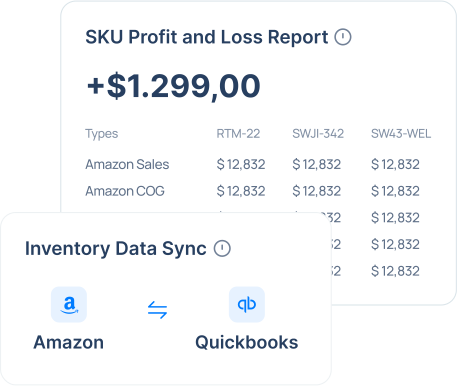
On the QuickBooks Inventory Sync plan, Taxomate also updates inventory in QuickBooks Online and helps you see profit by SKU.
Sync Amazon FBA inventory events with QuickBooks, including FBA shipments, customer returns, receipt of inventory, warehouse transfers and adjustments.
Import up to 18 months of FBA inventory history.
See the sales and fee breakdown per SKU with QuickBooks Online classes (requires a QuickBooks plan with classes).
14 Day Free Trial
Taxomate is an automated cloud-based accounting software designed to simplify the bookkeeping process for Amazon, eBay, Etsy, Walmart, and Shopify sellers. It imports Amazon payouts and posts summarized sales, fees, refunds and taxes to QuickBooks Online, Xero or Wave, so you do less manual entry.
Taxomate connects to your Amazon account to fetch transaction details such as sales, refunds, and fees. It then processes these transactions and automatically posts them as summarized entries into QuickBooks that match your Amazon payout reports, so each entry matches its deposit.
No, Taxomate does not charge extra fees for connecting multiple Amazon accounts or for importing historical data. Our pricing plans are designed to offer flexibility and scalability, allowing you to add as many accounts as you need without additional costs. Taxomate can import as much historical data as allowed by each sales channel.
Taxomate provides its users with a range of support options and resources. This includes email support, 1:1 video chat support, comprehensive guides, video tutorials, and a knowledge base filled with helpful articles. These resources are designed to help users navigate the software, from setup to advanced features, ensuring a smooth experience.
Start your free trial today and see how Taxomate can transform your ecommerce accounting.
14-day free trial • Cancel anytime