Shopify Xero Integration for Payout Reconciliation

Connect Shopify to Xero, import Shopify Payments payouts, and post reconciliation-ready sales, fees, refunds, taxes, and deposits into Xero.

check Answer the Shopify Xero integration question with a payout workflow, not a manual order export.

check Turn Shopify Payments payouts into Xero entries that match the Xero bank feed.

check Use your trial to prove one Shopify payout imports, posts, and reconciles before backfilling history.

Start Your 14 Day Free Trial

Get Started in Minutes

Shopify to Xero integration
Trusted by Thousands of Ecommerce Sellers, Accountants, and Bookkeepers
QuickBooks App Store
starstarstarstarstar

200+ Reviews

QuickBooks App Store

Capterra
starstarstarstarstar

16+ Reviews

Capterra

Xero App Store
starstarstarstarstar

60+ Reviews

Xero App Store

Workflow intent

Shopify Xero integration for payout reconciliation

Use this page when you are comparing Shopify Xero integration options, trying to connect Shopify and Xero, or looking for a cleaner way to turn Shopify Payments payouts into summarized Xero entries.

Common searches this page answers

  • Shopify Xero integration
  • Xero Shopify integration
  • Shopify and Xero
  • Shopify to Xero
  • Connect Shopify to Xero
  • Shopify Payments payout to Xero

Buyer questions

Buyer questions this workflow answers

These are the practical questions behind Shopify Xero integration searches. Use them to decide whether a payout-centered workflow is enough before you commit to a Shopify to Xero setup.

How do I connect Shopify to Xero without rebuilding payout spreadsheets?

Start with the Shopify Payments payout, import the related sales, fees, refunds, taxes, and adjustments, then review the summarized Xero entry before posting.

Can a Shopify Xero integration help reconcile deposits in Xero?

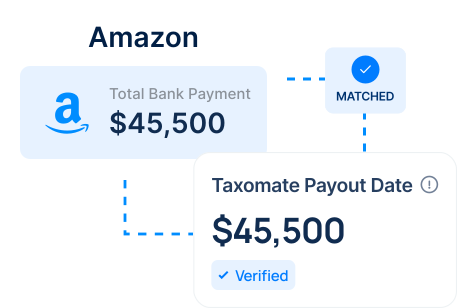
Yes, if the workflow uses the payout as the control total and posts a summarized entry that can be matched against the bank deposit in Xero.

What should I test first in a Shopify to Xero trial?

Use one recent Shopify Payments payout as the activation test. The workflow is ready to scale when the first import, first successful post, and bank reconciliation all line up.

First-post proof

Test Shopify to Xero with one Shopify Payments payout

Before you move months of Shopify history, use one representative Shopify Payments payout to verify that sales, discounts, refunds, fees, taxes, and the net deposit post cleanly into Xero.

  1. 1 Import one recent Shopify Payments payout that includes sales, fees, refunds, and tax activity.
  2. 2 Review the summarized Xero entry and confirm the Shopify deposit amount matches the bank feed.
  3. 3 Confirm the first successful post in Xero before expanding to more payouts or historical data.

Reconciliation playbook

Shopify Xero payout reconciliation playbook

Most Shopify Xero integration searches are really about turning Shopify Payments payouts into Xero entries that match the bank feed. Taxomate's workflow is built around the payout, not a raw order dump.

Reconcile Shopify Payments payouts

Import the Shopify Payments payout and summarize the connected orders, discounts, refunds, fees, tax, and adjustments around the net deposit.

Post a Xero-ready summary

Review the Xero posting summary before sending it, with sales, fees, refunds, discounts, taxes, and clearing entries separated for cleaner reconciliation.

Use one payout as the proof point

Start with one representative Shopify payout and confirm the first successful Xero post matches the bank deposit before importing older Shopify history.

Activation checklist

  • Shopify Payments payout imports with sales, refunds, discounts, fees, and tax lines.
  • Xero summary separates revenue, fees, refunds, taxes, and deposit clearing.
  • The first successful post in Xero reconciles to the Shopify bank deposit.

Comparing ecommerce accounting tools?

A2X vs Link My Books for Shopify to Xero

See how A2X, Link My Books, and Taxomate compare for this exact Shopify to Xero payout workflow before you test your first import and post.

Compare Options
Save Time, Money, and Grow Your Business

Exhausted from constantly grappling with the intricacies of manual data entry? Fed up with the time-consuming tasks and the ever-lingering possibility of human error? With our automated system, you can say goodbye to the tedious task of manually handling your financial data.

Embrace Automation

Embrace Automation

No more tedious data entry or human errors! Imagine a world where every sale made through Shopify automatically syncs with Xero into one easy invoice for easy matching with the deposits you receive from Shopify.

Supercharge Your Sales

Supercharge Your Sales

Make well-informed decisions and pave the way for sustainable growth and success. Understand your sales trends, track fees, analyze advertising costs, monitor shipping expenses, evaluate Cost of Goods Sold (COGS), and delve into other relevant financial metrics.

Accurate, Reliable, and Organized

Accurate, Reliable, and Organized

Taxomate ensures accurate and reliable data import, reducing the risk of errors and discrepancies in your financial records. Experience the convenience of a neatly organized summary invoice that meticulously breaks down all your sales, refunds, and fees.

Automation benefits
Benefits

Why automate your Shopify accounting?

Taxomate turns your chaotic sales and tax data into neatly summarized invoices that match perfectly with your payouts in Xero.

check

Time Savings: By automating your Shopify bookkeeping, you can save an average of 10+ hours per month compared to manual methods, freeing up valuable time to focus on other aspects of your business.

check

Error Reduction: With automation, the risk of human error is minimized, ensuring precise calculations and helping you pay the correct amount of Tax, thus maintaining compliance and avoiding unnecessary financial discrepancies.

check

Real-time Visibility: Stay on top of your financials with real-time updates, gaining a comprehensive overview of your cash flow and profitability, allowing you to identify potential opportunities and challenges.

check

Hassle-free Tax Compliance: Any changes in tax laws that may affect your Shopify business are automatically handled by Taxomate, ensuring you remain compliant without the burden of navigating complex tax regulations manually.

See all integrations

How Does Taxomate Work?

Getting started with Taxomate in 10 minutes or less.

1
Signup for a Free Trial

Getting started with Taxomate is a breeze! Simply sign up for our risk-free, no-obligation free trial to experience the benefits firsthand. It only takes a few moments to create your account, and you'll gain immediate access to our powerful platform.

2
Connect Your Shopify and Xero Accounts

Once you've signed up, seamlessly link your Shopify seller account and Xero. Our user-friendly interface will guide you through the process step-by-step, ensuring a smooth and secure connection.

3
Confirm Your Accounts & Taxes

During this step, you'll have the opportunity to confirm your specific accounts and tax settings. Whether you're dealing with multiple marketplaces or handling various tax jurisdictions, Taxomate can adapt to your requirements effortlessly.

4
Get Accurate and Automatic Books

Sit back and watch as Taxomate works its magic! Our advanced automation technology takes over, meticulously organizing your Shopify transactions and seamlessly integrating them into Xero. Gone are the days of manual data entry and tedious bookkeeping tasks. With Taxomate, your books will be accurate, up-to-date, and entirely automated.

Why Shopify sellers choose Taxomate

No more headaches, no more hassles. Taxomate simplifies your accounting process, so you can focus on growing your business and reaching new heights of success. Say goodbye to time-consuming accounting tasks and hello to streamlined, efficient financial management with Taxomate. Experience the transformation today and see how easy managing your Shopify sales can be!

Unparalleled Support

Experience the unparalleled support and personalized 1:1 onboarding, all at no additional cost! It's no surprise that Xero users consistently rate us 5/5, with an impressive track record of over 200+ reviews.

Secure

Rest easy knowing your sensitive financial data is safeguarded by state-of-the-art security measures. Our software is audited regularly by both Shopify and Xero.

Affordable Pricing

Our budget-friendly plans are designed to accommodate sellers of every scale - from individuals making their first foray into the market to established businesses expanding their reach. We believe in providing exceptional value at every price point.

UK/EU VAT Management

Effortlessly streamline your VAT management with our easy-to-follow VAT guide. Get your account operational in mere minutes and unlock the world of hassle-free VAT handling.

Frequently Asked Questions

What is Taxomate?

Taxomate is an automated cloud-based accounting software designed to simplify the bookkeeping process for Amazon, eBay, Etsy, Walmart, TikTok, and Shopify sellers. It integrates with Shopify to automate the transfer of financial transactions directly into accounting platforms like Xero, Wave, or QuickBooks, handling sales, fees, taxes, and more, thus reducing manual entry and increasing accuracy.

How does Taxomate integrate with Shopify and Xero?

Taxomate connects to your Shopify account to fetch transaction details such as sales, refunds, and fees. It then processes these transactions and automatically posts them as summarized entries into Xero that match your Shopify payout reports, making reconciliation a seamless task. Streamline bookkeeping tasks and ensure accurate financial reporting with Taxomate!

Do you charge extra for connecting multiple Shopify accounts or for importing historical data?

No, Taxomate does not charge extra fees for connecting multiple Shopify accounts or for importing historical data. Our pricing plans are designed to offer flexibility and scalability, allowing you to add as many accounts as you need without additional costs. Taxomate can import as much historical data as allowed by each sales channel.

What kind of support and resources does Taxomate offer to its users?

Taxomate provides its users with a range of support options and resources. This includes email support, 1:1 video chat support, comprehensive guides, video tutorials, and a knowledge base filled with helpful articles. These resources are designed to help users navigate the software, from setup to advanced features, ensuring a smooth experience.